Custom Admin Panels With Payload CMS
 Alex Hramovich6 min de lectura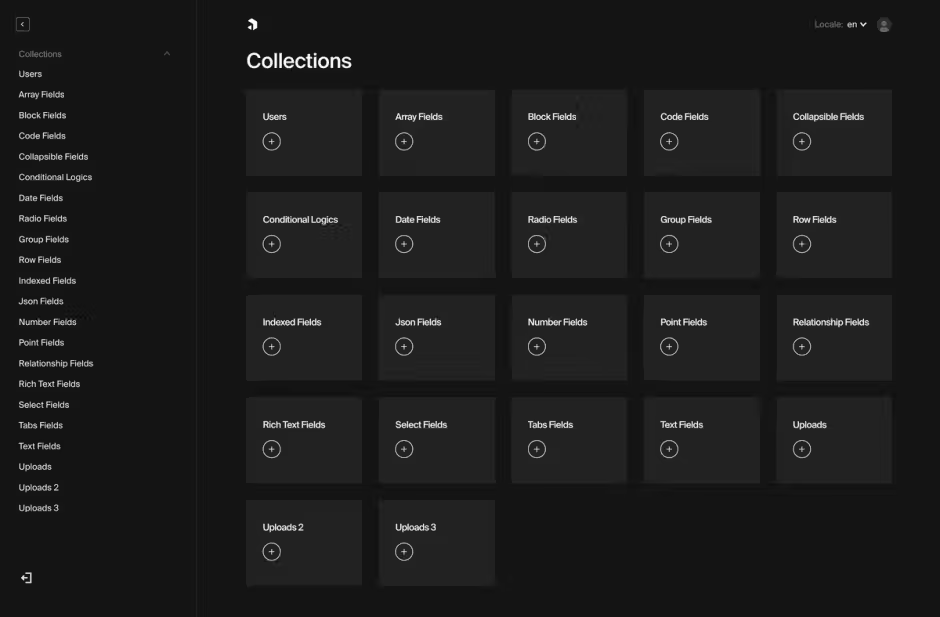
What is Payload Admin Panel?
Payload CMS admin panel is the built-in, generated interface where you manage content, users, and data in Payload CMS. It is created from your code-defined schemas, and Payload describes it as a beautiful, fully type-safe, high-performance admin panel.
What it does
The admin panel is where editors and developers work with collections, fields, and documents. Because Payload is code-first, the UI is generated from the content model you define in code rather than assembled manually in a separate builder.
Core Architecture: A Next.js Foundation with TypeScript Power
Payload CMS is designed as a NextJS fullstack framework that provides a comprehensive backend solution. The platform is entirely code-first, meaning everything from your database schema to admin interface is defined through intuitive JavaScript and TypeScript configurations. This approach gives developers ultimate control while maintaining excellent developer experience through strong typing and intelligent autocompletion.
The architecture follows modern best practices with a clear separation of concerns:
- Database layer: Abstracted through adapters for flexibility
- API layer: Multiple interfaces (REST, GraphQL, Local) generated automatically
- Admin UI: Built with React and completely customizable
- Security layer: Built-in authentication and granular access control
This architectural design allows Payload to serve as both a powerful backend and a customizable admin interface, all from a single codebase.
Database Flexibility: Adapter-Based With Advanced Features
Unlike many CMS platforms that lock you into a specific database technology, Payload is database agnostic through its adapter system. This means you can choose the database that best fits your project requirements.
Payload officially supports multiple database technologies through adapters:
- MongoDB (ideal for projects with dynamic fields and localization)
- PostgreSQL (perfect for projects requiring rigid data structures)
- Other databases via community adapters
The database interaction layer provides sophisticated features including:
- Automatic schema generation with proper indexing
- Transaction support for data integrity
- Direct database access when needed
- Migration utilities for schema evolution
Choosing the Right Database
Non-Relational Databases (like MongoDB) are excellent choices when:
- You prefer simplicity within your database
- You don't want to manage production/staging synchronization via DDL changes
- Your project uses extensive localization
- You leverage many arrays, blocks, or
hasManyselect fields
Relational Databases (like PostgreSQL) work better when:
- You need rigid database architecture with strong schema enforcement
- Your data has complex relationships that benefit from SQL joins
- You have team members with SQL expertise
API Ecosystem: Multiple Interfaces, One Source of Truth
One of Payload's most powerful features is its ability to automatically generate multiple API interfaces from a single configuration. This means you define your data structure once and get multiple ways to interact with it.
REST API
Every collection and global in Payload generates a full REST API with endpoints for all CRUD operations. This API follows RESTful conventions and includes powerful features like filtering, sorting, and pagination; field-level access control; deep population of related documents; and versioning and drafts.
GraphQL API
In addition to REST, Payload automatically generates a complete GraphQL API with queries for single documents and lists, mutations for creating/updating/deleting, custom resolvers for specialized operations, and nested relationship querying.
Local API
What truly sets Payload apart is its Local API, which allows direct database interaction within Node.js without any network latency. This is especially powerful for React Server Components (fetch data directly without API calls), seed scripts for populating test data, custom server routes with additional functionality, and access control and hooks implementation. The Local API provides remarkable performance advantages over traditional headless CMS platforms that require HTTP requests to third-party servers.
Type Safety: End-to-End TypeScript Integration
Payload is built from the ground up with TypeScript, providing comprehensive type safety throughout your application stack. The system automatically generates TypeScript interfaces based on your collection and field definitions, ensuring type consistency across database operations, API responses, admin panel components, and client applications.
This end-to-end type safety reduces bugs, improves developer confidence, and enhances code maintainability. The Payload config itself is strongly typed, providing helpful IDE features like type-ahead suggestions while authoring your configuration.
Collection System: Powerful Content Modeling
At the heart of Payload's data architecture is its collection system. Collections are groups of documents sharing a common schema and serve as the primary way to structure recurring data in your application.
Collections can be configured with custom fields of various types, authentication and access control, custom admin UI components, hooks for extending functionality, versioning and drafts, and compound indexes for performance optimization.
Migration Framework: Safe Database Evolution
As applications evolve, database schemas need to change. Payload provides a robust migration framework that makes database schema evolution safe and manageable. Migrations follow a simple pattern with two key functions:
Each migration executes within a transaction, ensuring that database changes are atomic — either all changes succeed or none do. The migration system includes CLI commands for creating and running migrations, transaction support for safe execution, the ability to roll back failed migrations, and integration with Payload's access control system.
Hosting Options: Cloud or Self-Hosted Flexibility
Payload offers complete flexibility in deployment options, allowing you to choose the approach that best fits your project requirements and budget.
Self-Hosting
As an open-source platform with an MIT license, Payload can be self-hosted on any infrastructure that supports Node.js applications. This gives organizations complete control over server infrastructure and scaling, database configuration and optimization, file storage systems, security implementations, and compliance requirements. Self-hosting is ideal for organizations with specific infrastructure requirements or existing DevOps capabilities.
Admin Panel: Customizable and Powerful
Payload's admin panel is where many of its advantages for content management become apparent. Built with React, the admin interface provides a clean, intuitive user interface; responsive design for all devices; customizable branding and components; role-based access control; live preview capabilities; and dark and light mode support.
Unlike many CMS platforms with rigid admin interfaces, Payload allows deep customization of the admin experience through component overrides, custom CSS, and specialized views.
Conclusion
Payload CMS represents the best-in-class solution for developers seeking to build sophisticated admin panels. Its unique combination of database flexibility, multiple API interfaces, TypeScript integration, powerful collection system, robust migration framework, and flexible hosting options make it stand out in the crowded CMS landscape.
For teams that value developer experience, type safety, and complete control over both frontend and backend, Payload offers an unmatched solution that grows with your application needs. As an open-source platform with both self-hosted and cloud options, Payload ensures you're never locked into a specific vendor or pricing model.
If you are looking for Payload CMS development services that can help you build custom admin panels, schedule a free consultation to discuss your admin panel needs — we'll discuss your request in detail, scope the project, and estimate it for you, everything within 2-3 days since the intro call.